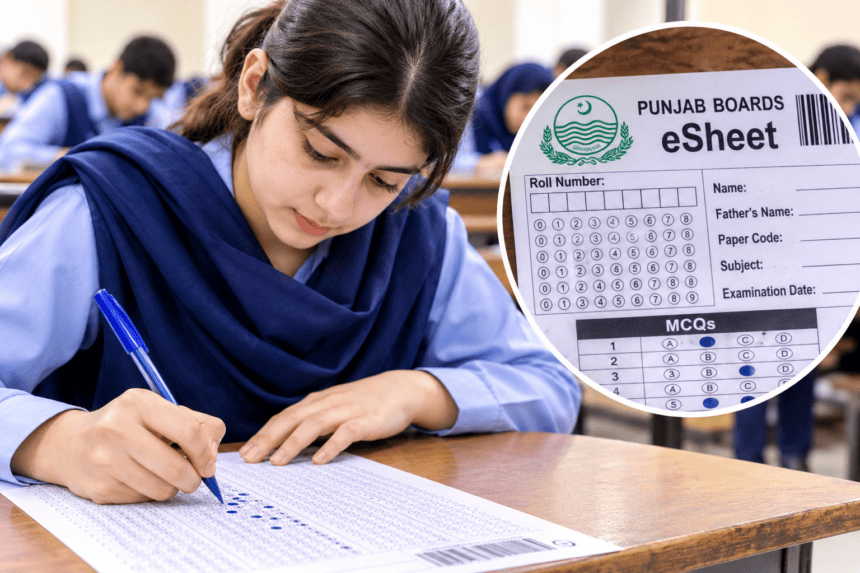
LAHORE, November 5, 2026: Education boards across Punjab have introduced the eSheet system for selected papers of the Intermediate Second Annual Examinations 2026. Under this system, students will continue writing their answers on paper, but examination boards will scan completed answer sheets so examiners can check them digitally through an on-screen marking system.
Boards including Lahore, Gujranwala, Multan and Sargodha have issued instructions to help students understand the new answer-sheet format.
The system requires candidates to enter their examination details correctly, fill MCQ bubbles carefully and write answers within the designated spaces. Mistakes in these sections could create problems during scanning and digital assessment.
What Is the Punjab Board eSheet System?
The eSheet is a specially designed examination answer sheet that allows students to write answers by hand while enabling examiners to evaluate scanned copies on computer screens.
BISE Gujranwala has shared an illustrated guide for students appearing in Computer Science and Statistics examinations. The guide explains how to complete identification details, mark MCQs and attempt written questions.
Students from other Punjab boards can use these instructions as a reference, but they must follow the specific format and directions issued by their respective examination boards.
How to Fill Punjab Board eSheets Correctly
Step 1: Use the Correct Pen
According to the BISE Gujranwala guide, students should use a blue ballpoint or fountain pen. Gel pens, markers and highlighters are not permitted under the illustrated instructions.
Candidates should check the directions issued by their own examination board before the examination.
Step 2: Enter Your Roll Number Correctly
Students must write their examination roll number in the designated boxes and fill the corresponding bubbles for each digit.
They should carefully compare the number with their official roll number slip to avoid mistakes that could affect identification and processing.
Step 3: Complete Personal and Examination Details
Candidates must provide the required information in the appropriate sections. This may include their name, father’s name, examination date, roll number and subject details.
Students should ensure that all information matches their official examination records and complete the paper code section according to the printed instructions.
Step 4: Fill MCQ Bubbles Completely
Students must completely darken the selected bubble for each multiple-choice question instead of using a tick, cross or partial mark.
They should also check the question number before marking their answers and avoid unnecessary marks on the response sheet.
Step 5: Write Short Answers in the Designated Spaces
The eSheet provides separate spaces for short questions. Students must write their answers in the correct sections and follow the question numbers printed on the answer sheet.
According to the BISE Gujranwala format, short-question answers begin on page 5, with separate spaces for Questions 2, 3 and 4. Page numbers may differ across other boards.
Step 6: Complete Long Questions Within the Allocated Pages
Students must attempt long questions in their designated sections and avoid extending answers into unrelated spaces.
The BISE Gujranwala guide allocates separate answer spaces for Questions 5 to 9, beginning on page 19. Candidates should follow the page allocation printed on their actual examination answer sheets.
Step 7: Avoid Writing on Barcodes and Margins
Students must not write over barcodes, QR codes or other printed identification marks because these elements help examination authorities identify and process scanned answer sheets.
They should also keep their answers within the permitted margins and avoid unnecessary overwriting or markings.
Step 8: Use the Designated Rough Work Page
Candidates should complete calculations and rough notes in the space reserved for this purpose.
In the BISE Gujranwala illustrated format, page 34 is designated for rough work. The guide also states that additional answer sheets will not be provided, so students should manage the available space carefully.
Step 9: Check Your eSheet Before Submission
Before submitting their examination papers, students should review their roll numbers, personal details, MCQ responses and written answers.
They should ensure that all required sections are complete and that no unnecessary marks have been made in reserved areas.
Important Instructions for Intermediate Students
Although several Punjab boards have introduced the eSheet system for selected examination papers, answer-sheet layouts and page numbers may vary.
Students should carefully read the instructions printed on their own answer sheets and follow the directions issued by their respective boards.
The new system does not require students to write their examinations on computers. They will continue using paper answer sheets, while the checking process will take place digitally after scanning.
The eSheet system aims to modernize examination assessment and improve the management of answer-sheet checking across Punjab.